r-WASD Digital 16 V2 Game Controller
- NEW: ANALOG (Xinput) Mode
- Auto Calibration (Manual still available)
- Each of the 16 buttons supports up to 5 customizable macro steps ONBOARD(!) and parallel macro execution with a minimum response time of just 2ms!
- Adjustable thumbstick position
- HALL Sensor joystick module (from February of 2025)
- "Right-Sided" version also available for left-handed users
- Multipy profiles
- Joystick-controlled digital WASD buttons with diagonal movement.
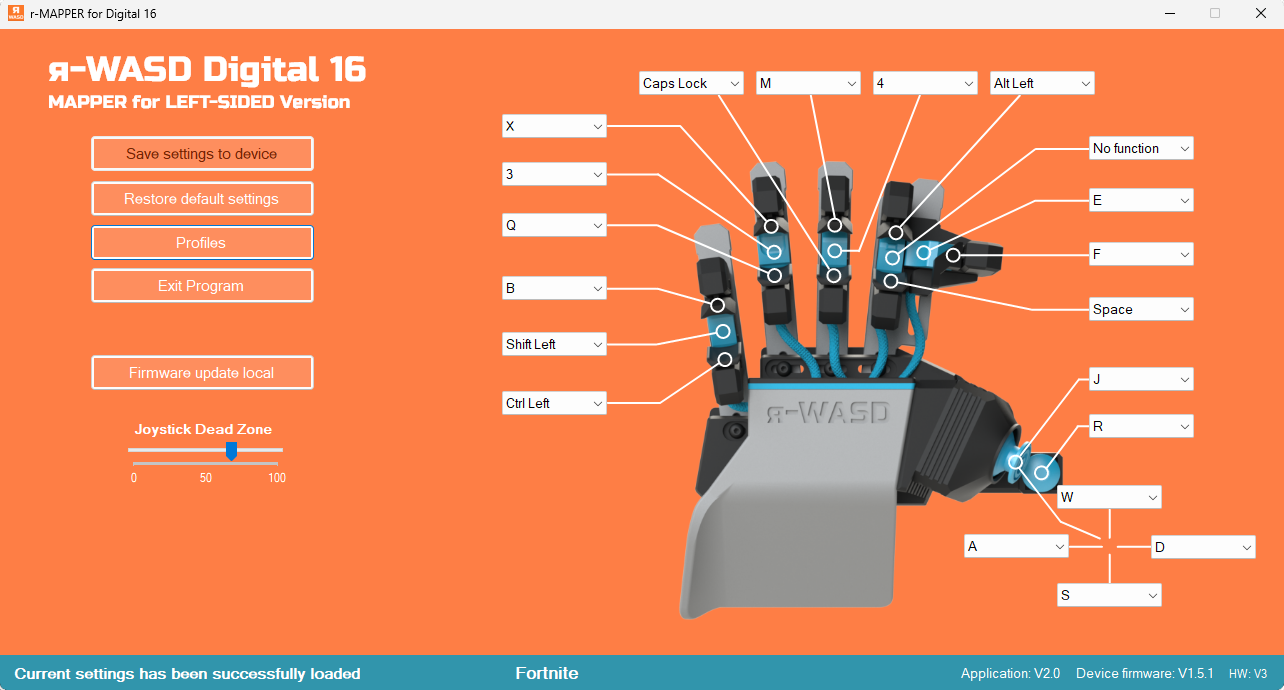
- 16+(4 joy@8 AXIS) remappable buttons via our r-MAPPER software
- Adjustable button spacing for different finger lengths
- No external software required for use
- Strong 3D printed parts
- Long life OMRON Switches
- It can be used in games where a controller is not applicable.
- PC (Windows 7-11), X-BOX compatible*
- Handcrafted in the European Union
- 1000Hz Polling Rate
ANALOG (XInput) or DIGITAL (KeyBoard) Mode?
You’re free to choose whichever control style your game requires. If you need gradual acceleration or deceleration in a racing game, or smooth walking speed for your character, Analog Mode will likely be the better choice. (Keep in mind: the game must support simultaneous input, and this feature is available only on Windows PC.)
For all other games or devices, DIGITAL Mode is the recommended option. With Axis Extension, you can closely replicate analog directional control — the only exception is the gradual acceleration/deceleration effect.
Remember: even in DIGITAL Mode, the device still processes the joystick’s analog signals. The intersection points of the neighboring axes are blended using our dedicated algorithm, enabling accurate 8-directional control, not just raw 0/1 input!
Working on PC (Analog+Digital), X-Box and Linux (Digital Mode only). On PC you can remapping DIGITAL Mode's layout as you wish via our r-MAPPER software.
*A keyboard (like r-WASD Digital 16 Series) setup allows for a lot more precision and fluidity in games, as you’ll know if you regularly game on PCs and consoles. However, while your keyboard will work everywhere in the console menus, you won’t be able to use them in every game you play. And that’s not least because it would give you an unfair advantage over other players online using standard controllers. If you need to know whether a specific title supports a keyboard, a quick web search is the easiest way to find out here for X-Box.
All 16 buttons (except the joystick) can now be assigned macro sequences of up to 5 steps, with customizable durations ranging from 2ms to 9999ms per step — and even parallel execution is supported. Best of all, macros are saved directly into the profile and run from the device itself. That means there’s no need to run r-MAPPER — all macros are processed on the device, ensuring the fastest possible response time at 1000Hz polling rate!


An example of button layout is shown below, as well as the new r-MAPPER, with which you can customize it as you wish. You can save, delete, export and import profiles, Copy and Paste macro steps and more.

The Axis Extension allows us to closely mimic the feel of an Xbox controller's analog stick, as directional input is smoothed by overlapping and extending axis ranges instead of triggering sharp directional changes.

What is in the box?
Quick Arm & Buttons Setup